Overview
This guide explains how to configure sequential test execution in TestGrid Codeless Automation. Sequential execution allows one test suite to automatically trigger another test suite after completion, such as running a Mobile test suite after a Web test suite or running a Web test suite after a Mobile test suite.
This is useful for end-to-end workflows where different parts of the user journey must be validated across web and mobile platforms without manual intervention.
Prerequisites
Access to TestGrid Codeless Automation.
Existing Web and Mobile test suites.
Permission to edit test cases.
Basic understanding of Custom Expressions or Test Functions.
Supported Scenarios
Scenario | Description | Process Type |
|---|---|---|
Web to Mobile | Triggers a Mobile test suite after Web execution | oaa |
Mobile to Web | Triggers a Web test suite after Mobile execution | ow |
How It Works
Sequential execution is configured by adding an API call as the final step of a test case.
For example:
A Web test case runs first.
The final step triggers a Mobile test suite using the CI API.
The Mobile test suite starts automatically.
The same approach can be used in reverse for Mobile to Web execution.
Importing Dependencies
Required Java Imports
- Select the project
- Select the version
- In the Import Statements, select add import and add the following
import okhttp3.MultipartBody;
import okhttp3.OkHttpClient;
import okhttp3.Request;
import okhttp3.Response;
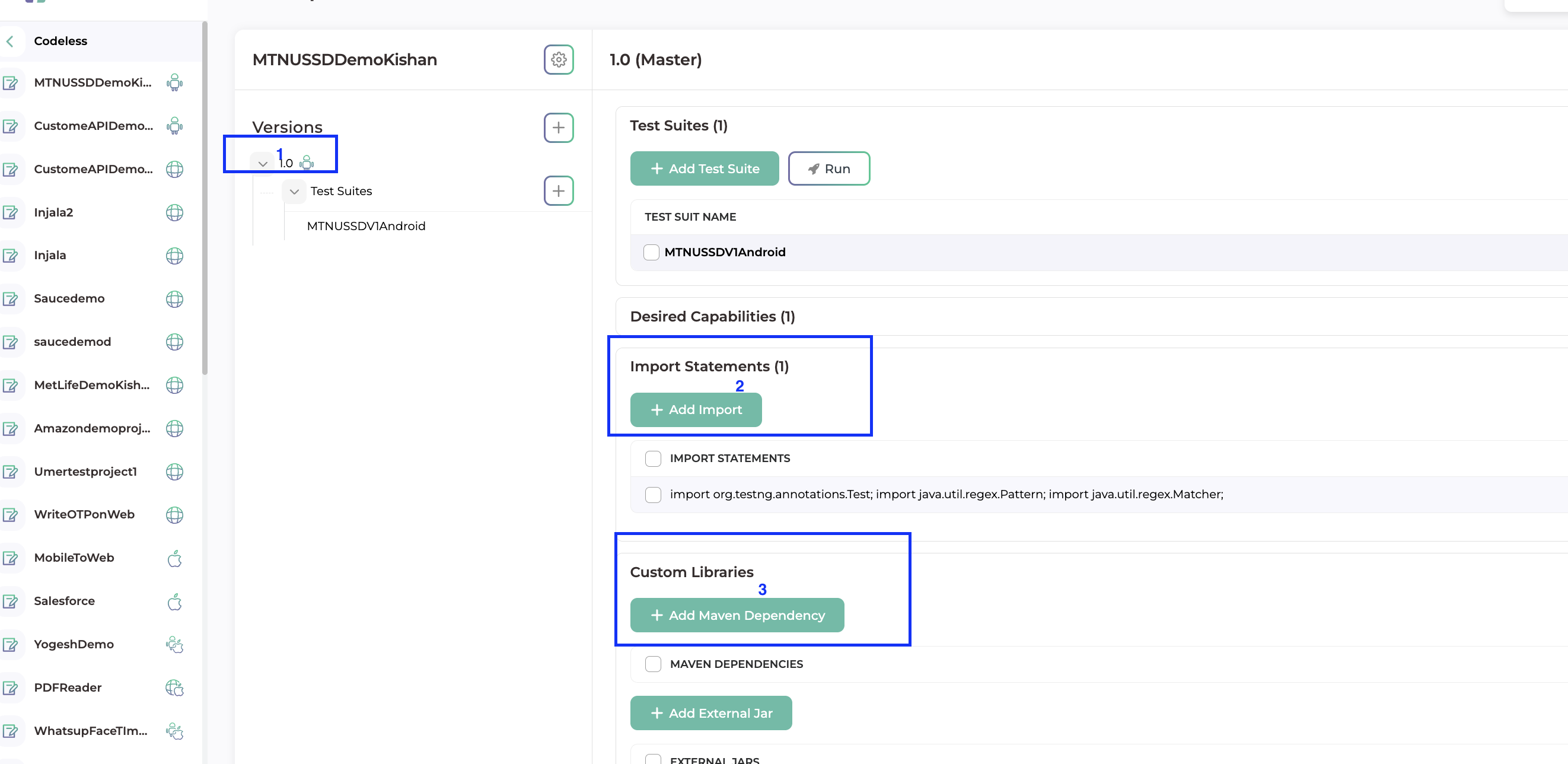
In the custom libraries, click on Add Maven Dependency
Add the following, dependency
<dependency>
<groupId>com.squareup.okhttp3</groupId>
<artifactId>okhttp</artifactId>
<version>4.12.0</version>
</dependency>
Steps
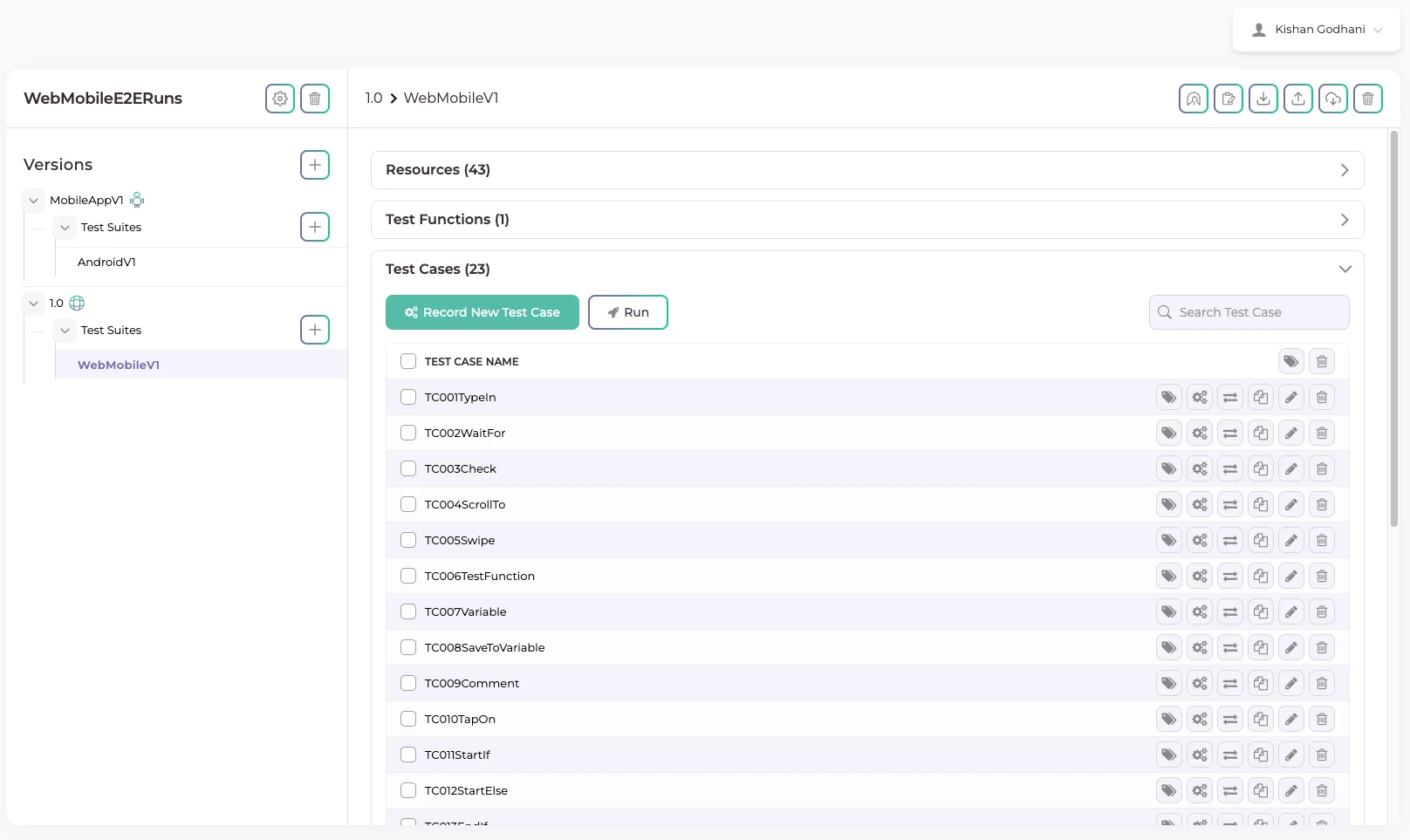
Step 1: Create the Primary Test Case
Create the Web or Mobile test case that should run first.
Complete all required test steps using Codeless Automation.
Step 2: Get CI Information
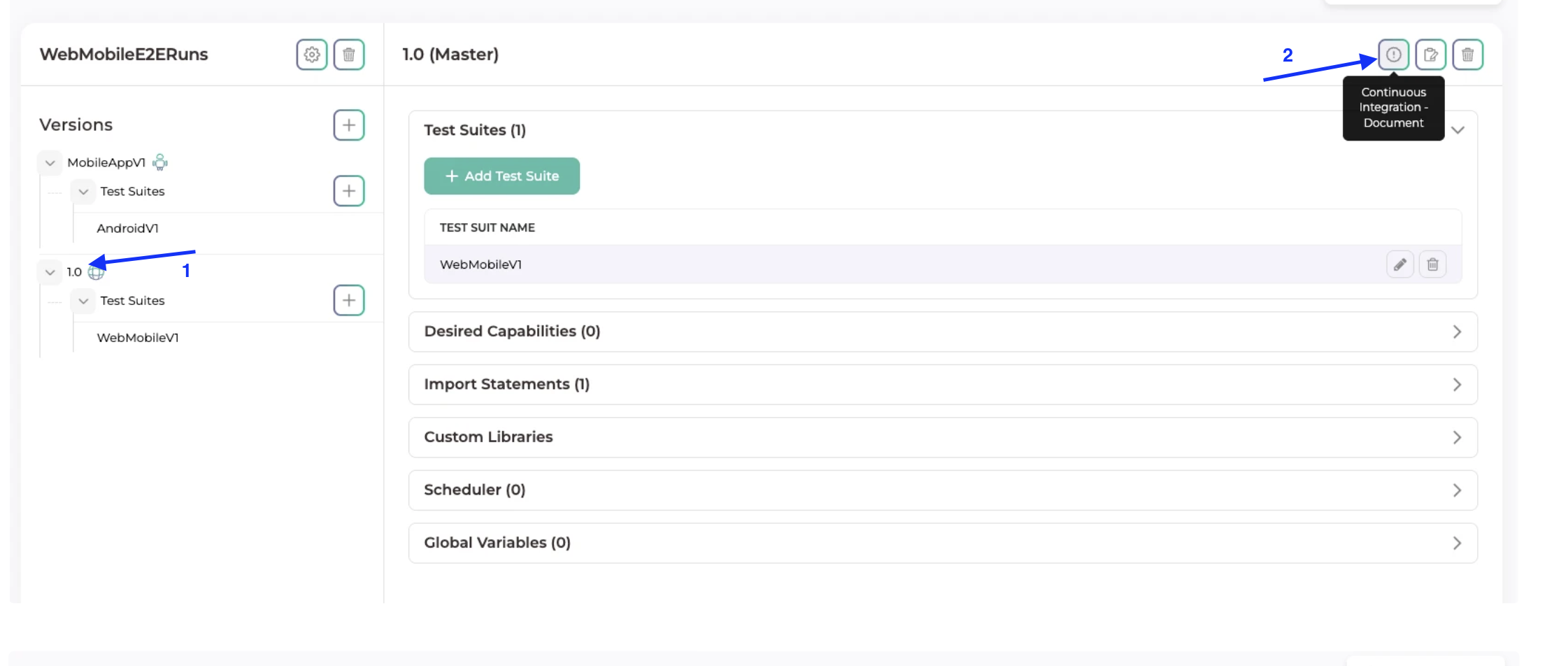
Navigate to:
Codeless → Versions
Click the Info (i) icon in the top-right corner.
Collect the required details:
User Token
Application Token
Version Token
Version Module ID
Device ID
App Build ID
Bundle Identifier
Website URL
Step 3: Add the API Trigger as the Final Step
Edit the last step of the primary test case.
Add a Custom Expression or Test Function that triggers the next suite through the API.
Java Example: Web to Mobile Trigger
Use the following Java snippet inside a Custom Expression or reusable test function to trigger a Mobile test suite after a Web test execution.
OkHttpClient client = new OkHttpClient();
MultipartBody body = new MultipartBody.Builder()
.setType(MultipartBody.FORM)
.addFormDataPart("user_token", "YOUR_USER_TOKEN")
.addFormDataPart("application_token", "YOUR_APPLICATION_TOKEN")
.addFormDataPart("version_token", "YOUR_VERSION_TOKEN")
.addFormDataPart("version_module_id", "YOUR_VERSION_MODULE_ID")
.addFormDataPart("s_device", "DEVICE_ID")
.addFormDataPart("process_type", "oaa")
.addFormDataPart("bundle_identifier", "YOUR_BUNDLE_ID")
.addFormDataPart("app_build_id", "APP_BUILD_ID")
.addFormDataPart("tags", "pipelines")
.build();
Request request = new Request.Builder()
.url("https://{your_base_url}.testgrid.io/ci/app_build_run")
.header("Cookie", "_testgrid=YOUR_SESSION_COOKIE")
.post(body)
.build();
try (Response response = client.newCall(request).execute()) {
System.out.println("API Response Code: " + response.code());
System.out.println("API Response: " + response.body().string());
} catch (Exception e) {
e.printStackTrace();
}
Java Example: Mobile to Web Trigger
Use the following Java snippet to trigger a Web test suite after a Mobile test execution.
OkHttpClient client = new OkHttpClient();
MultipartBody body = new MultipartBody.Builder()
.setType(MultipartBody.FORM)
.addFormDataPart("user_token", "YOUR_USER_TOKEN")
.addFormDataPart("application_token", "YOUR_APPLICATION_TOKEN")
.addFormDataPart("version_token", "YOUR_VERSION_TOKEN")
.addFormDataPart("version_module_id", "YOUR_VERSION_MODULE_ID")
.addFormDataPart("s_device", "DEVICE_ID")
.addFormDataPart("process_type", "oaa")
.addFormDataPart("bundle_identifier", "YOUR_BUNDLE_ID")
.addFormDataPart("app_build_id", "APP_BUILD_ID")
.addFormDataPart("tags", "pipelines")
.build();
Request request = new Request.Builder()
.url("https://{your_base_url}.testgrid.io/ci/app_build_run")
.header("Cookie", "_testgrid=YOUR_SESSION_COOKIE")
.post(body)
.build();
try (Response response = client.newCall(request).execute()) {
System.out.println("API Response Code: " + response.code());
System.out.println("API Response: " + response.body().string());
} catch (Exception e) {
e.printStackTrace();
}
API Parameter Reference
Parameter | Required | Description |
|---|---|---|
user_token | Yes | User authentication token from CI settings |
application_token | Yes | Application token from CI settings |
version_token | Yes | Version token for the selected suite |
version_module_id | Yes | Version module ID from CI settings |
s_device | Yes | Target device ID |
process_type | Yes | Defines execution type: oaa for Mobile, ow for Web |
bundle_identifier | Required for Mobile | Bundle identifier of the target app |
app_build_id | Required for Mobile | Uploaded app build ID |
test_website_url | Required for Web | Website URL to execute |
tags | Optional | Runs only test cases mapped with the specified tag |
Verifying Sequential Execution
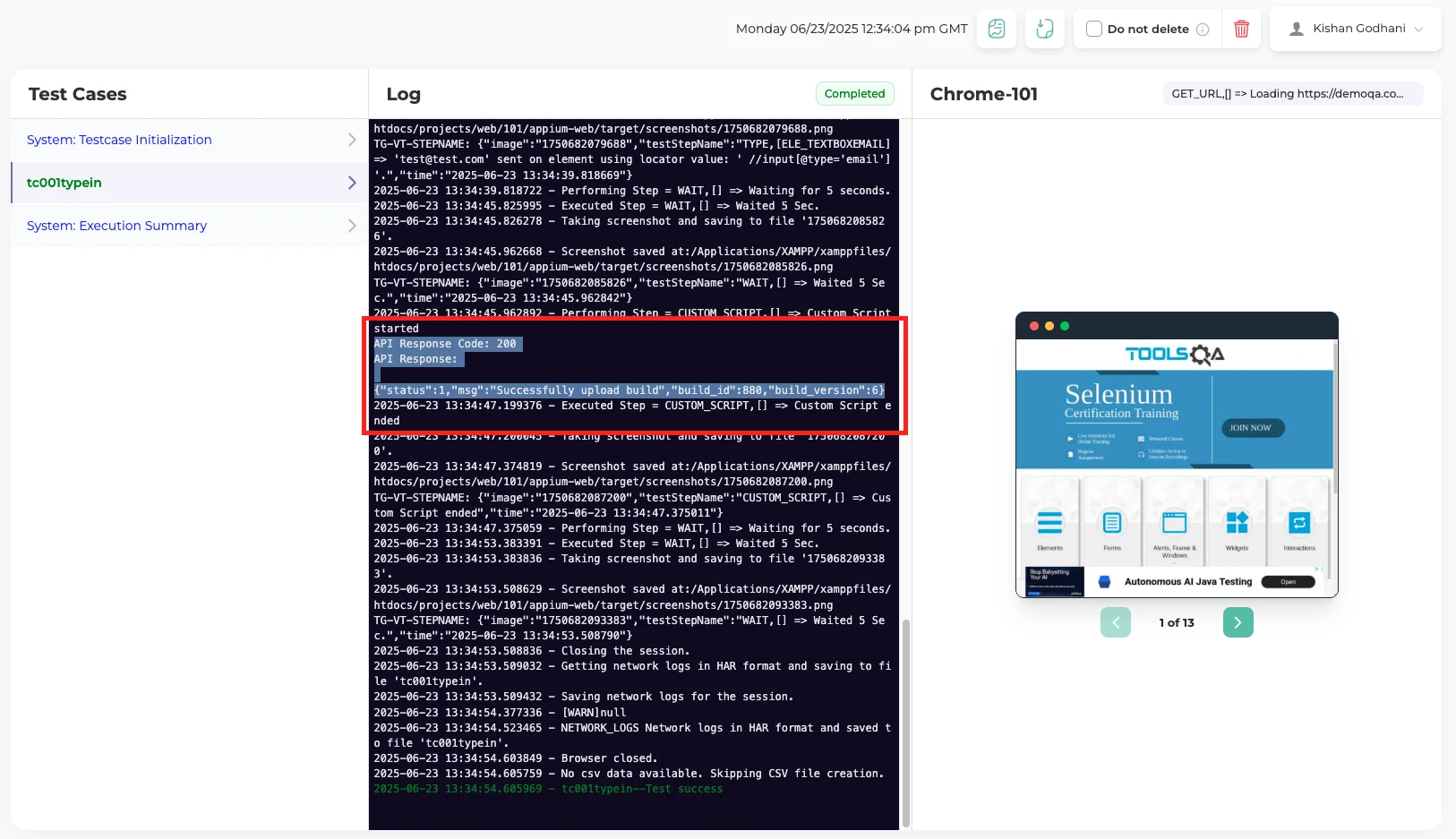
After running the first test suite:
Open the execution logs.
Check the API response status.
Verify that the next build or test run was triggered.
Navigate to Test Results.
Confirm that both the primary and triggered executions are visible.
Best Practices
Add the API trigger only as the final step of the test case.
Validate the API call separately before adding it to the test case.
Use tags when only selected test cases need to run.
Keep token values updated as per project CI settings.
Use reusable test functions for repeated sequential execution flows.
Outcome
Sequential execution is successfully configured between Web and Mobile test suites. Once the primary test suite completes, the next suite is automatically triggered through the TestGrid CI API, enabling end-to-end automation across platforms without manual intervention.
Was this article helpful?
That’s Great!
Thank you for your feedback
Sorry! We couldn't be helpful
Thank you for your feedback
Feedback sent
We appreciate your effort and will try to fix the article